Unity Macro System
From the Game Accessibility Guidelines:
Games that involve a large amount of repetitive sequences of actions can result in pain and fatigue, in turn resulting in reduced play sessions.
Macro functionality, i.e. being able to set up complex sequences of actions that can then be executed by a single click or keypress, can provide a hugely beneficial relief from this, significantly reducing the demands that interacting with the game puts on the player.
The Unity Input Macro system provides an easy and versatile way for Unity game developers to allow their players to create custom user-defined macros, which record a sequence of input commands that are then triggered by one key.
There are three main portions of this package:
- The macro menu UI
- The abstract base classes
- The example scene and scripts that demonstrate the functionality using Unity's Input System
This project was created using Unity 2022.3.62f3. The latest Unity package is available for download from the repository on GitHub.
Macro Menu UI
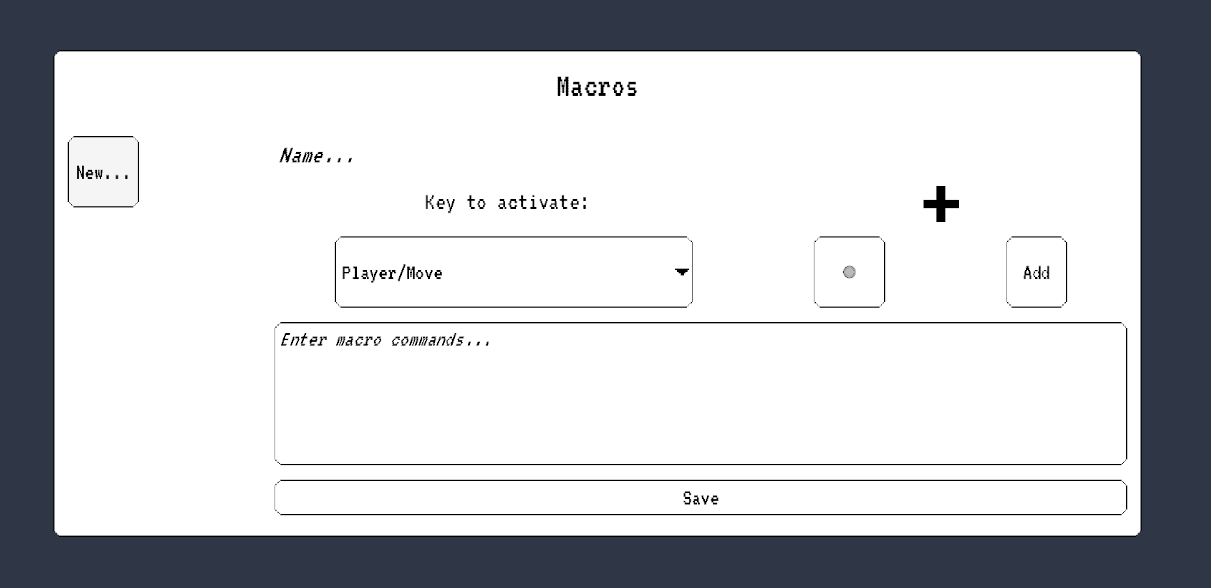
The menu UI allows players to directly interface with game input in order to create macro sequences. Macros are given a custom title, a keybind to trigger, a dropdown list of valid actions to select with a field for any additional input, and a text list of commands that stores all details of the input sequence.
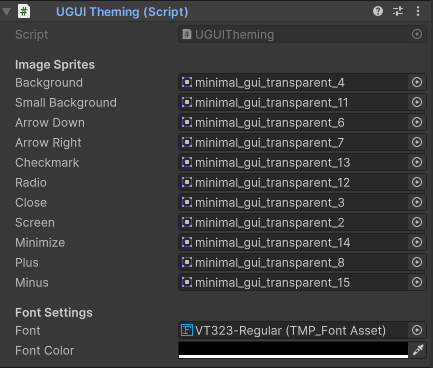
The theme of all UI elements can be readily changed using the fields in the drawers of the UGUI Theming component in the Inspector.
If a project requires other kinds of images, developers can add new exposed Sprite fields and ThemedType enum values to the
underlying scripts UGUITheming.cs and ThemedImage.cs.
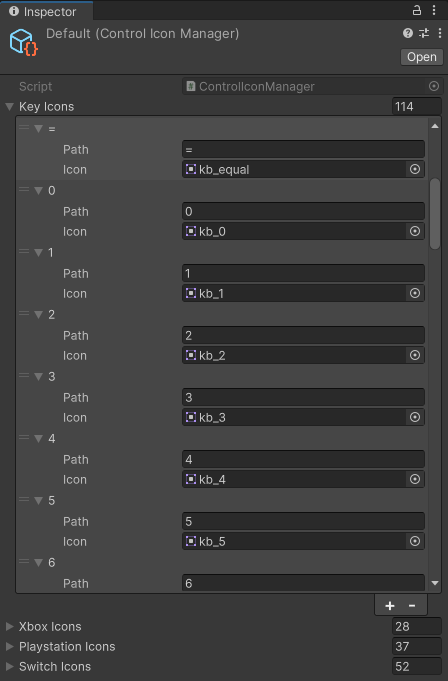
Developers can map their custom input control icons using a Control Icon Manager asset, a type of Scriptable Object. Each Control Icon Manager holds any number of prompts for devices such as keyboard, mouse, and popular controller brands. These assets also allow looking up icons by path to make displaying each icon easy from a script.
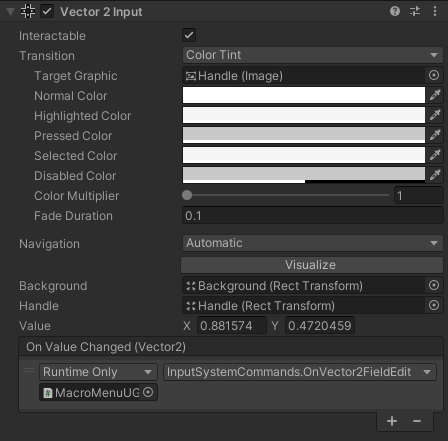
Since Unity UI does not have an intuitive control for allowing users to define a vector, this package also includes a custom
Unity UI component: Vector2Input.cs. This is used to give players a natural interface to define directional input, such as WASD
composites, joysticks, or pointer movement. Similar to Unity UI's Slider, the Vector2Input component has a square background with
a small knob in the center that can be dragged to indicate a direction.
The MacroMenu Component
MacroMenu is the component behind the macro GUI. The functions in this class add the functionality to all of the UI buttons,
display the input that triggers a macro on the screen, and handles saving and loading.
Abstract Base Classes
Every game has its own unique input needs, so the abstract classes in this package aim to create a robust base for an easily
extendable macro system that is input-agnostic. The core functionality of the macro system is located in MacroBase.cs,
MacroMenu.cs, and MacroSet.cs.
MacroBase
MacroBase is a Scriptable Object that represents a single user-defined macro. Required fields are a name for the macro macroName,
a string commands representing the commands of the input sequence in text form, and a string triggerPath representing the device
input path of the control that will trigger the sequence.
Macros also have two methods, ParseCommands and Bind. ParseCommands is where the macro links the commands in the
commands field to an actionable sequence of executable code. Bind sets the triggerPath of the macro to allow any receiving
input manager to handle and carry out the macro.
MacroSet
MacroSet is a wrapper class for a dictionary of string-macro pairs. In addition to the expected dictionary methods,
MacroSet contains three additional classes: SerializeToJson, LoadFromJson, and Enable. This allows the set of
macros to be saved to a JSON file on the system, and depending on the input management system used, enables all macros as
input actions.
Input System Demo
Included with the base code and UI is an example implementation using the Unity Input System.
Credits
The following packages were used in this project:
- Kittehface Software Controller Prompts by JStatz - CC0
- Minimal GUI by CruzR - CC0
- VT323 Font by Peter Hull and Jacques Le Bailly - SIL Open Font License 1.1
- Top Down Prototype Character Template by LumenLorePixels
- Input System Combo Tree by Ahmed Al-Hulaibi - MIT License